ID Photo Maker: Free Passport Photos That Never Leave Your Browser
ID Photo Maker crops a portrait to the official size for 75 passport, visa and ID documents and prints a 4 x 6 or A4 sheet, entirely inside your browser tab.
ID Photo Maker is a free SkillSafe-hosted web app that crops a portrait to the official size for 75 passport, visa and ID documents, then lays it out on a 4 x 6 inch or A4 print sheet. Every step runs in your browser tab. No upload, no account, no watermark.
Updated September 2026: the U.S. Department of State now tells applicants not to alter a passport photo with software, apps, filters or artificial intelligence, and says it checks submissions for AI use. ID Photo Maker crops, scales and lays out; it does not retouch faces.
Most online passport photo tools work the other way: you upload a picture of your face to a server you know nothing about, wait, and get back a watermarked preview and a price. Here the cropping, the head-height guides, the background check and the printable sheet are all computed on your device, and nothing is sent anywhere. That is not a policy claim — it is a Content Security Policy the browser enforces, and it is the same gate SkillSafe applies to every hosted app.
Key figures
| Figure | What it measures | Source |
|---|---|---|
| 75 | Documents with official size and framing rules built in | ID Photo Maker size chart |
| 14 | Languages the tool and its guides are published in | ID Photo Maker |
| 2 x 2 in | U.S. passport photo, 51 x 51 mm | U.S. Department of State |
| 25 to 35 mm | Head height the U.S. accepts, chin to crown | U.S. Department of State |
| 35 x 45 mm | UK, Schengen and most European formats | GOV.UK |
| 600 x 750 | Minimum pixel dimensions for a UK digital photo | GOV.UK |
| 50 KB to 10 MB | File-size band GOV.UK accepts for a digital photo | GOV.UK |
| 300 or 600 | DPI options on export | ID Photo Maker |
| 0 | Bytes of your portrait that cross the network | Enforced by the app’s CSP |
What it does, in four steps
- Pick the document. The app carries the official size and framing rules for passport, visa and ID documents from 45+ countries — 75 formats in all — from the U.S. 2 x 2 inch passport photo to Brazil’s 5 x 7 cm print and China’s 33 x 48 mm standard. Each one links to the authority that publishes the rule.
- Drop in a portrait. JPEG, PNG, WebP or HEIC. Head-height and eye-line guides show where the face has to sit; you drag and zoom until it does.
- Align to the guides. The head-height band is the constraint that actually gets photos rejected. The U.S. wants 25 to 35 mm from chin to crown; the UK wants 29 to 34 mm; Germany wants 32 to 36 mm. Three documents can share the same 35 x 45 mm print size and disagree on where the face belongs inside it.
- Download. A single photo at 300 or 600 DPI, or a 4 x 6 inch or A4 sheet with several copies laid out for a pharmacy kiosk or a home printer. The U.S. online renewal flow gets a square digital JPEG sized for the State Department’s upload tool.
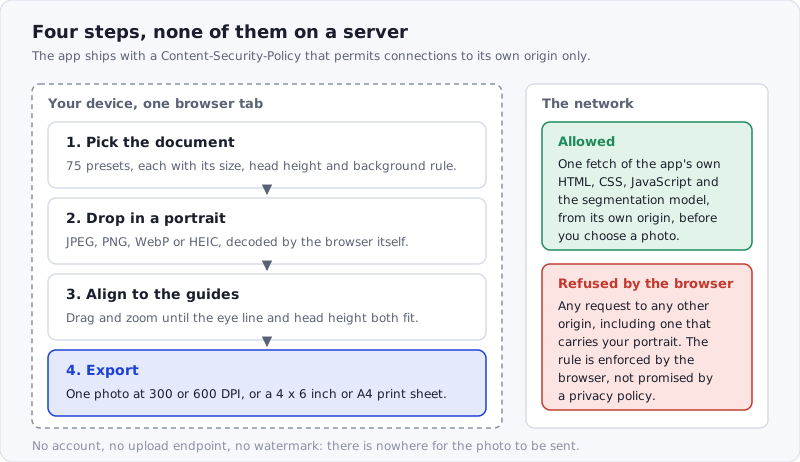
Figure: the only network request the app is permitted to make is the one that loads the app itself. There is no upload endpoint to disable.
The requirements are documented as pages, not just presets. There is a size chart for every country and format, a plain-language explanation of why the U.S. now rejects AI-edited passport photos, and guides on glasses, head coverings, babies, backgrounds and printing. The tool and the document pages are available in 13 languages besides English, including Chinese, Portuguese and Spanish.
Why it runs on SkillSafe
ID Photo Maker uses no AI model on a server and no server function at all. It is a static bundle: HTML, CSS, JavaScript and a small on-device segmentation model for the background check. SkillSafe hosts it at its own subdomain, serves it under a strict Content Security Policy that forbids the page from calling anywhere except its own origin, and scans every release before it goes live. For a tool whose whole promise is “your face never leaves the device”, that policy is the point: the browser enforces it, not a privacy statement.
That is also what makes it a good example of an app that needs no metering. The platform’s credit system, model routing and account features are there when an app wants them; an app that does its work client-side simply does not switch them on, and costs its publisher nothing per run.
Try it
Open id-photo-maker.skillsafe.ai, choose a document, and drop in a photo. If you only need the rules, the document index lists every standard with its official source. The app’s SkillSafe listing, with its scan status and release history, is at /apps/id-photo-maker/.
If you have built something client-side that people keep asking you to host, deploying it as a SkillSafe app gives it a subdomain, a CSP and a scan for free.
Frequently Asked Questions
Is it safe to upload a photo of your passport to an online tool?
Treat it as publishing the document. Once a passport image is on someone else’s server you cannot recall it, and you usually cannot tell how long it is retained or who it is shared with. The FTC’s Consumer Sentinel Network logged 6.5 million consumer reports in 2024 with more than $12.5 billion in fraud losses. A tool that never uploads the image removes the question entirely.
What can someone do with a picture of your passport?
A clear passport image carries your full name, date and place of birth, document number and expiry date, plus a face photo — enough to open accounts, pass weak identity checks, or seed a convincing impersonation. It is not a credential on its own, but it is the raw material for one, which is why the safest handling is to share the fewest copies possible.
Does the United States accept AI-edited passport photos?
No. The State Department’s current guidance tells applicants not to change a passport photo with computer software, phone apps, filters or artificial intelligence, and says photos are checked for AI use. Cropping to the required size and laying out a print sheet are not edits to your face; background replacement, skin smoothing and relighting are. ID Photo Maker does the former only.
How can I tell that a browser tool really is not uploading my photo?
Open the browser’s Network tab, load the page, then add a photo and export one. If the image never leaves, you will see requests only while the page loads and none afterwards. A stricter check is the page’s Content-Security-Policy header: a connect-src that names only the app’s own origin means the browser will refuse an upload even if the JavaScript tries one.
More SkillSafe apps: browse the app directory