@adamoutler/dash
Keep your agents from hallucinating their way to the finish by hooking them into provable results.
<img src="docs/icon.jpg" width="40" height="40" alt="Dash Logo" style="vertical-align: middle"> 🛑 Stop AI Hallucinations! Your Ultimate Dash & Agent Guardrail 🚀


The essential CI feedback loop and guardrail for autonomous AI development.
Tired of your AI agent confidently hallucinating: "I changed it, so now it works. I'll push the changes!" only to break the main branch? 🤦
Welcome to the Dash—a beautifully simple, Dockerized hub that gives you an at-a-glance view of your projects, while serving as the ultimate guardrail for your AI agents (Claude, Gemini, GPT). Without a feedback loop from your Continuous Integration (CI) pipeline, agents fly blind. This dashboard serves as a foundational building block to provide immediate, factual build feedback to autonomous agents, stopping regressions in their tracks.
"A unified dashboard for your autonomous agents, beautifully designed for your workflow—whether you prefer the light of day or the terminal dark."
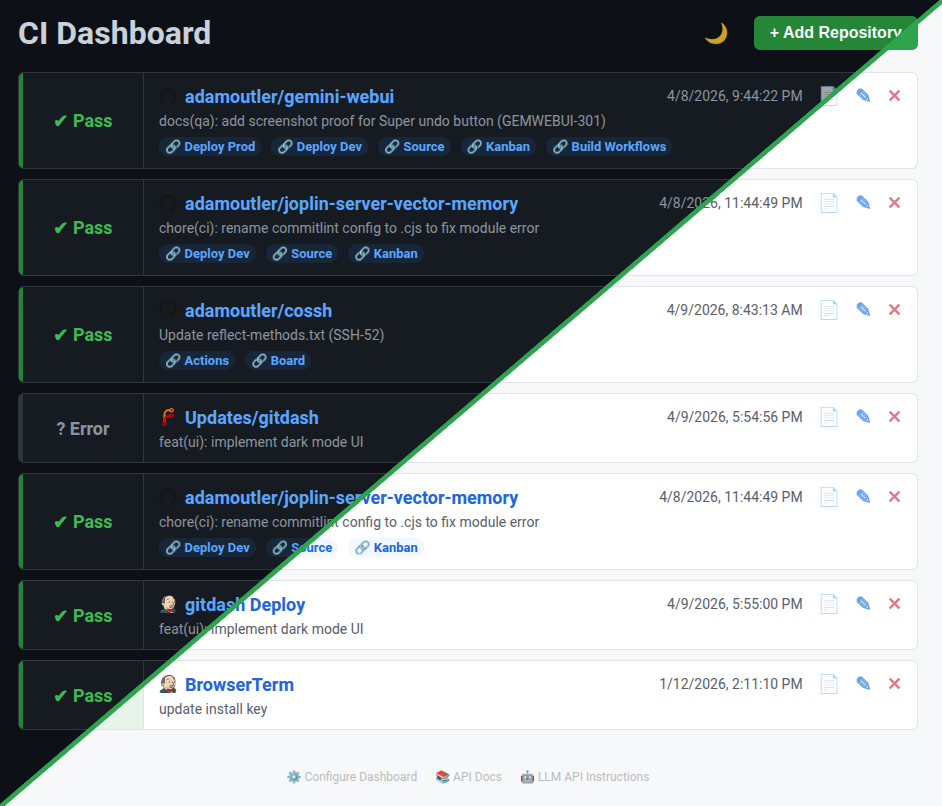
✨ Key Features
- 🔐 Secure & Authenticated: Role-based access with Basic Auth and Bearer Token management. (Highly recommended: See our Security & Authentication Guide to lock down your dashboard).
- 🤖 AI-Ready MCP Server: Built-in JSON-RPC 2.0 endpoint (
/mcp) exposing essential macros (get_status,get_logs,wait) for agents. - 📜 Agent Discovery: Includes
llms.txtat the root so autonomous agents can self-discover capabilities. - 🚦 Unified Visual Dashboard: A clean, centralized UI to view build statuses across all tracked repositories at a glance.
- 🔌 Multi-Provider Support: Seamlessly integrates with both GitHub and Forgejo CI/CD pipelines.
- 🛡️ Autonomous Guardrail: Allows agents to estimate wait times, wait for CI runs, and fetch logs autonomously to prevent broken pushes.
- 🐳 Dockerized Simplicity: Easy to deploy with a single
docker-compose upcommand.
🤖 For AI Agents: The Guardrail API
By pointing your agent to the repository URL and our llms.txt (see a raw example of what the LLM sees here), you instantly give them superpower hooks to interact with your CI/CD pipeline. No more blind pushes! Your agent can now:
📚 Comprehensive AI Guide: See the full AI/Agent Journey for detailed automated workflows.
⏱️ Estimate wait times for CI runs.
⏳ Wait patiently for the CI pipeline to finish.
📥 Receive immediate results the second the build passes or fails.
📜 Request full CI logs to autonomously debug failures.
🔗 Access important URLs and check the current build status programmatically.
🔌 MCP Server (Model Context Protocol)
The dashboard natively supports the Model Context Protocol (MCP). Autonomous agents (like Claude Desktop or Gemini) can connect directly to the /mcp endpoint via JSON-RPC 2.0.
get_status: Get a clean, markdown-formatted status report of any configured project, keeping your terminal tidy while the agent gets raw JSON context.get_logs: Retrieve the direct log URL for a failing build.wait: Instruct the agent to sleep and wait for the CI pipeline to complete before proceeding.- Self-Discovery: The
repoandworkflowparameters for these tools support a"help"argument, allowing agents to automatically discover what repos they can track without guessing!
🔌 Pro-Hacks: Setting Up Agent Hooks
Agents can discover how to use the dashboard simply by reading the llms.txt file at the root URL. You can use standard prompts to wire up these hooks:
Hack 1: The "Push & Wait" Hook
Instruct your AI (Claude/Gemini/GPT) to run a script after pushing code that waits for the build and echoes the result:
"After pushing code, run a script to wait for the build. Fetch the results using
curl -N -s 'https://your-dashboard-url/api/wait?provider=github&owner=your_user&repo=your_repo' | jq .statusand report back to me."
Hack 2: The "Tooling" Hook
Give your agents a custom tool to gather build results across all your projects so they can check statuses before deciding what to work on next:
"Before marking the task as complete, gather build results from the Dash using
curl -s https://your-dashboard-url/api/statusto verify that your changes did not break the build."
💻 For Humans: The Visual Hub
Beyond acting as an API for AI, the Dash provides a clean, unified graphical experience for human developers. It's all about peace of mind:
🗺️ Comprehensive User Guide: See the full User Journey for detailed human workflows.
🎨 Visual Sanity & At-a-Glance Status: A clean, large-font UI to view the current build status of all your projects on a single screen.
🚦 Color-Coded Statuses: Instantly see what's Running, Passed, or Failed. Stop digging through nested CI provider menus just to see if your
mainbranch is green.🎯 Deep Linking & Quick Actions: Custom quick-action links (Deploy, Source, Kanban) get you exactly into the specific failing pipeline, commit, or log output you need to investigate with zero friction.
➕ Adding Repositories in the UI
When clicking + Add Repository in the dashboard, the input format depends on the CI provider you select:
- GitHub / Gitea / Forgejo:
- Owner: The username or organization name (e.g.,
adamoutler). - Repo: The repository name (e.g.,
dash).
- Owner: The username or organization name (e.g.,
- Jenkins:
- Owner: A custom display name for the dashboard (e.g.,
dash DeployorBrowserTerm). - Repo: The full URL to the main project/job page (e.g.,
https://jenkins.adamoutler.com/view/Upgrades/job/Updates/job/dash/job/master/).
- Owner: A custom display name for the dashboard (e.g.,
🚀 Get Started
For AI Agents:
Just point your agent to <your-dashboard-url>/llms.txt and tell it to read the docs. It will know exactly what to do! 🧠
For Humans (Deployment):
- Clone the repo:
git clone <repository-url> cd ci-dashboard - Set your
GITHUB_TOKEN,FORGEJO_URL, and/orFORGEJO_TOKENin your environment (or.envfile). - Run via Docker Compose for a stress-free setup:
docker-compose up -d
(Note: Keep it safe! Run locally or on an internal network, not the public internet).
💡 Loving the seamless workflow? Drop a ⭐ on the repo and share your favorite AI automated workflows in the issues!
Loading...
Select a file to preview
Analyzing security...
Checking scan reports and verification data.
Bill of Materials
Everything this skill can do — files, network, commands, and more.