How to Charge Users for an AI App Without Stripe
Stripe's 30c fixed fee is 31x a typical $0.0096 AI run. Meter in credits instead: $1 = 10,000 credits, a 0-100% markup you keep in full, zero billing code.
Don’t integrate a payment provider. Stripe charges 2.9% + 30c per transaction; on a $0.0096 AI run, the 30c alone is 31x the charge. Meter usage instead: SkillSafe Apps bills each run in credits ($1 = 10,000 credits) at model list cost, you set a 0-100% markup and keep all of it.
Updated September 2026: the per-job overhead that used to sit inside every run’s base is now $0, so a run is priced purely on tokens. All provider rates below were re-checked against Stripe’s pricing page, Anthropic’s pricing docs and Cloudflare’s Workers AI pricing on 17 September 2026.
Key figures
| Figure | What it measures | Source |
|---|---|---|
| 2.9% + $0.30 | Stripe’s fee per successful domestic card charge | Stripe pricing |
| $15.00 | Stripe’s fee for each dispute you receive | Stripe pricing |
| 0.7% | Stripe Billing pay-as-you-go rate on billing volume (or from $620/month on a 1-year contract) | Stripe pricing |
| $0.008 | Provider list cost of a 3,000-in / 1,000-out Claude Haiku 4.5 run ($1 / $5 per MTok) | Anthropic pricing |
| $0.0096 | What that run costs the user on SkillSafe at the default 10% markup | model catalog |
| 31x | Stripe’s fixed 30c against the whole price of that run | calculated |
| $1 = 10,000 credits | SkillSafe’s denomination; 1 credit = $0.0001 | SkillSafe |
| 0-100% | Owner markup range, taken on compute cost; owners keep 100% of it | SkillSafe |
| 10% | Platform margin, the only cut SkillSafe takes on a run | SkillSafe |
| 5,000 / 500,000 | Sponsorship caps in credits: per user per day / per app per day | SkillSafe |
| 3,000 credits | Signup grant for a new verified account ($0.30) | SkillSafe |
| 2,000 credits | Daily grant on each day you actively use the platform ($0.20) | SkillSafe |
| 14 days | Earnings maturity before cash-out, matching the card-dispute window | SkillSafe |
Why per-run card charges don’t work
An AI app’s costs scale with tokens, not seats. Charge a flat subscription on top of variable inference costs and you either overcharge light users or lose money on heavy ones. Metering solves that. Charging for each metered unit with a card does not, and the reason is arithmetic rather than engineering. Stripe’s own pricing page states the rate plainly:
2.9% + 30c per successful transaction for domestic cards.
That 30c is fixed. A Claude Haiku 4.5 run of 3,000 input and 1,000 output tokens costs $0.008 of inference at Anthropic’s published $1 / $5 per million tokens, and $0.0096 to the user on SkillSafe once the platform’s 10% and a default 10% owner markup are added. Put that single charge through a card and the fixed fee alone is 31x the amount you are collecting. Add $15.00 per dispute and 0.7% of billing volume for Stripe Billing, and the model stops being a pricing decision and becomes a floor: you cannot bill a fraction of a cent through a card network.
So platforms that meter AI usage do the obvious thing — take payment in larger prepaid blocks and spend it in tiny increments. A $5 credit pack costs 2.9% + 30c, or $0.445, about 8.9% of the pack; a $1,000 pack costs $29.30, about 2.9%. The per-run charge then happens inside a ledger, where a $0.0096 debit is just a row.
Building that ledger yourself is the month of work. Stripe’s own usage-based billing guide is explicit about the moving parts: meters and meter events, usage recording, billing credits for prepaid balances, usage-threshold alerts, and a choice between the Billing Meters API and Metronome for anything with prepaid credits or credit burndown. Every one of those is a thing you own, test, and answer support tickets about.
Step 1 - Deploy your skill as an app
Monetization starts from a deployed app. If you haven’t done that yet, it’s one prompt to your agent — the walkthrough is in How to Turn a Claude Code Skill Into a Web App.
Step 2 - Set a markup
This is the whole of your pricing, and it’s one slider on your dashboard (or PATCH /v1/apps/:slug). A run’s base is the model provider’s list cost for the tokens it consumed — there is no per-job overhead. The platform adds 10% of that base as its margin; you add your markup — 0% to 100% — of the same base. You keep 100% of your markup; no fee is taken out of it. At the default 10% you and the platform earn exactly the same amount per run.
A pure-utility app can sit at 0% and cost users close to raw compute; a polished product with a real audience can price like one. The dashboard shows what each setting pays you per run, measured against your app’s own average run. The full arithmetic, model by model, is in What It Costs to Run an AI App on SkillSafe.
Step 3 - Fund free usage when it helps you grow
Sponsorship inverts the flow: you cover your users’ runs from your own wallet, capped at 5,000 credits per user per day and 500,000 credits per app per day. It’s a built-in freemium lever — free for users, bounded spend for you. Apps that never charge at all are labeled as free in the directory.
What actually happens during a run
Nothing above requires a webhook handler, because the whole lifecycle is one server-side state machine. The platform quotes the worst case before the run, reserves it, executes, settles against the usage the provider actually reports, and returns the difference:
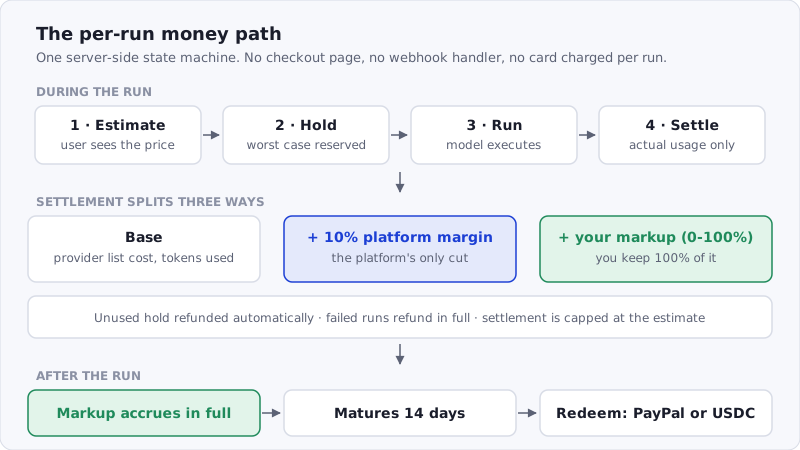
Figure: the per-run money path. The user is never charged more than the estimate they saw, and a failed run refunds the whole hold.
Two properties fall out of that shape. The user can never be charged more than the estimate they approved, because settlement is capped at the hold. And a failed run costs nobody anything: the hold is released in full, so an app earns by being useful rather than by failing expensively.
The other half: user accounts you didn’t build
Billing without accounts is half a product. SkillSafe apps get the account system for free too: anyone can run your app as a guest with no sign-up (guest runs are funded by your sponsorship budget from Step 3), and users who want persistence sign in with their existing SkillSafe account in one click. Your app can request consent-scoped access to a user’s profile or email, and every token is scoped to your app and that user alone — app A can never read app B’s users or data. You write no login flow, no session handling, no password reset emails.
Where the money comes from
Your users’ side is simple: new SkillSafe accounts start with 3,000 free credits ($0.30), active users receive a 2,000-credit daily grant ($0.20) on each day they use the platform (free credits expire after 7 days), and anyone can top up with credit packs from $5 to $1,000. That baseline matters more than it sounds — it means your app launches into an audience that can already pay, instead of an audience that bounces at a checkout form. At the $0.0096 Haiku run above, the signup grant alone covers about 31 runs before anyone reaches for a card.
Your side is the markup, which accrues in full and matures for 14 days — the card-dispute window — before it becomes redeemable. The creator-side walkthrough, including what the earnings look like at each markup setting, is in How to Make Money With Claude Code Skills.
When you should just use Stripe
Honesty clause: a credit-metered platform is the right tool for AI mini-apps, not for everything. If you need full control over pricing and checkout, enterprise invoicing, or you’re selling something whose cost doesn’t scale with inference, a classic Stripe integration on your own stack is still the better call — and at a $50 average order value, 2.9% + 30c is 3.5%, which is a rounding error rather than a design constraint. The trade is control for speed: SkillSafe gets you from working skill to metered product in an afternoon. If you’re still choosing a host, Streamlit vs Spaces vs Custom GPTs vs SkillSafe Apps compares the four on exactly this axis.
Frequently Asked Questions
How to add user accounts and billing to an AI app?
Use a platform where both are features rather than code. On SkillSafe, users arrive as guests with no sign-up or sign in with one click, consent scopes gate profile and email access, and billing is credit-metered per run with pre-run estimates, automatic refunds of unused holds, and refunds on failure. There is no auth or payment code to write.
What’s the best way to monetize a custom AI agent?
Usage-based pricing beats flat pricing for agents because costs scale with tokens: a heavy user pays for what they use and a light one isn’t subsidising them. Deploy the agent as a metered app and start with a modest markup — you can raise it once you know what people actually run. Note that credits can’t be transferred between accounts on SkillSafe, so there is no subscription or in-app-purchase lane; everything you earn rides on usage.
Can you charge less than a cent per transaction?
Not through a card network. Stripe’s fixed 30c per successful charge sets the floor, which is why every AI platform that bills per run sells prepaid blocks and debits a ledger. SkillSafe’s unit is 1 credit = $0.0001, so a 4-credit chat turn on the default Workers AI model is billed exactly rather than rounded up to a cent.
How do my users actually pay?
They spend credits from their SkillSafe wallet — a 3,000-credit signup grant, 2,000 credits on each active day, plus credit packs from $5 to $1,000 to top up. The platform holds the estimated cost when a run starts, settles to actual usage, and routes your markup — in full — to your earnings dashboard.
Do I have to handle refunds or disputes?
Not for run billing. Unused holds are returned automatically when a run completes, and failed runs are refunded without anyone filing a ticket. Card disputes stay with the platform, which is where Stripe’s $15 dispute fee lands too. That policy is platform-wide, which keeps the incentives clean: apps earn by being useful, not by failing expensively.