How to Install Any Agent Skill With npx skills add (and Verify It First)
npx skills add installs a skill folder into every agent directory it detects. The exact syntax, the 79 agent paths, and the check to run before you install.
npx skills add <source> installs an agent skill into every coding agent the CLI finds on your machine — 79 of them, from .claude/skills/ to ~/.cursor/skills/. The CLI is Vercel Labs’ MIT-licensed skills package, downloaded 34,043,985 times in the 30 days to September 11, 2026. Read the scan report first.
The tool defines its own subject in one sentence:
Agent skills are reusable instruction sets that extend your coding agent’s capabilities. They’re defined in
SKILL.mdfiles with YAML frontmatter containing anameanddescription.
That is the whole format: a folder, a markdown file, some frontmatter. This post covers the exact command forms the CLI accepts, where each agent reads skills from, the other six subcommands, how to install from the SkillSafe registry with the same command, and the one check worth running before any of it.
Key figures
| Figure | What it measures | Source |
|---|---|---|
| 79 | Agents skills can install into (4 named in the README plus “75 more”) | vercel-labs/skills |
| 34,043,985 | Downloads of the skills npm package, Aug 13 to Sept 11, 2026 | npm downloads API |
| 31,876 | GitHub stars on the MIT-licensed CLI repository | vercel-labs/skills |
| 2,723 | Forks of that repository | vercel-labs/skills |
| 1.7.0 | Latest published version of the skills npm package | npm registry |
| 8 | Source formats skills add resolves, from GitHub shorthand to a local path | README, Source Formats |
| 7 | Subcommands: add, use, list, find, remove, update, init | README, Other Commands |
| 2 | Install scopes: project (default) and global (-g) | README, Installation Scope |
| 10 MiB / 25 MiB / 1000 | Download, extraction and file-count caps on a direct-URL install | README, Source Formats |
| 25,445 | Stars on the open Agent Skills specification repository the format follows | agentskills/agentskills |
| 3.4M | All-time installs of the top skill on the skills.sh leaderboard (find-skills) | skills.sh |
| 30,433 | Skills in the SkillSafe registry, each one a git remote | SkillSafe registry |
| 28,761 | Of those with a scan report attached | SkillSafe registry |
| 794,693 | Installs on one popular registry skill, @vercel-labs/vercel-react-best-practices | Skill page |
| 110,286 | Installs on @vercel-labs/next-best-practices | Skill page |
| 36.82% | Share of 3,984 audited skills carrying at least one security flaw | Snyk ToxicSkills |
| 1,184 | Malicious skill packages catalogued in the ClawHavoc campaign | Post-mortem |
The last two rows are why the verification section exists. An install is not a download; it is a set of instructions handed to an agent that already holds your credentials.
One command, eight kinds of source
The canonical form is a GitHub shorthand. Every command form below is taken from the README of version 1.7.0, current in September 2026:
npx skills add vercel-labs/agent-skillsskills add resolves the argument first as a repository, then as a direct download. Everything below is a supported source per the README:
| Source form | Example |
|---|---|
| GitHub shorthand | npx skills add vercel-labs/agent-skills |
| Full GitHub URL | npx skills add https://github.com/vercel-labs/agent-skills |
| One skill inside a repo | npx skills add https://github.com/vercel-labs/agent-skills/tree/main/skills/web-design-guidelines |
| GitLab URL | npx skills add https://gitlab.com/org/repo |
| Azure Repos | npx skills add https://dev.azure.com/org/project/_git/repo |
| Any git URL, including SSH | npx skills add [email protected]:vercel-labs/agent-skills.git |
| Local path | npx skills add ./my-local-skills |
| Direct download URL | npx skills add https://example.com/download/my-skill |
Private repositories use the same command as public ones — the CLI reuses whatever authentication is already configured for that URL: Git credential helper first, then GitHub CLI, then SSH. GITHUB_TOKEN or GH_TOKEN are optional and only needed when none of those is set up.
The direct-download path is the one with hard limits, because it is the one where the CLI is fetching an opaque archive rather than cloning a repository. Downloads cap at 10 MiB, extracted content at 25 MiB, and archives at 1000 files, overridable with SKILLS_DOWNLOAD_MAX_BYTES, SKILLS_EXTRACT_MAX_BYTES and SKILLS_EXTRACT_MAX_FILES “when you trust the source.” The archive may be a .zip, .tar, .tar.gz or .tgz, or a single SKILL.md, and the URL does not need a file extension.
Where the files actually land
Two decisions happen at install time: which scope, and which agents.
Scope is project or global. Project is the default and writes into the repository you are standing in, so the skill is committed and every clone gets it. Global (-g) writes into your home directory, where the skill follows you across every project on that machine.
| Scope | Flag | Location | Use case |
|---|---|---|---|
| Project | (default) | ./<agent>/skills/ | Committed with your project, shared with the team |
| Global | -g | ~/<agent>/skills/ | Available across all projects |
Agents are auto-detected. The README is explicit about the fallback:
The CLI automatically detects which coding agents you have installed. If none are detected, you’ll be prompted to select which agents to install to.
Each agent has its own pair of paths. These are the ones most readers will care about, taken from the README’s supported agents table:
| Agent | --agent value | Project path | Global path |
|---|---|---|---|
| Claude Code | claude-code | .claude/skills/ | ~/.claude/skills/ |
| Cursor | cursor | .agents/skills/ | ~/.cursor/skills/ |
| Codex | codex | .agents/skills/ | ~/.codex/skills/ |
| Windsurf | windsurf | .windsurf/skills/ | ~/.codeium/windsurf/skills/ |
| OpenCode | opencode | .agents/skills/ | ~/.config/opencode/skills/ |
| Gemini CLI | gemini-cli | .agents/skills/ | ~/.gemini/skills/ |
| GitHub Copilot | github-copilot | .agents/skills/ | ~/.copilot/skills/ |
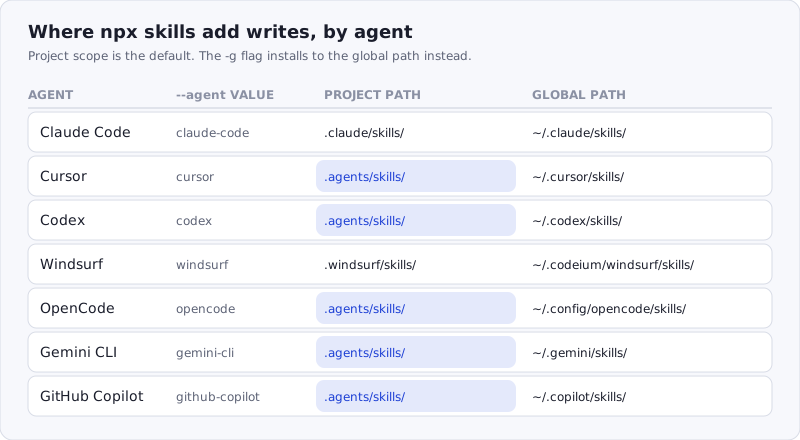
Figure: five of the seven agents share .agents/skills/ at project scope and differ only in where their global copy lives. That shared path is the Agent Skills convention; the per-agent global path is not.
Those paths are the agents’ own, not the CLI’s. Claude Code’s two scopes match Anthropic’s Agent Skills reference, Cursor documents its own skills directory, and GitHub publishes Copilot’s. The shared .agents/skills/ project path comes from the Agent Skills specification, which is why one install can serve several tools at once.
When more than one agent is targeted, the CLI offers two write methods. Symlink (recommended) points every agent directory at one canonical copy — one source of truth, and npx skills update moves all of them at once. Copy (--copy) writes independent copies for agents or filesystems where symlinks do not work, and accepts the drift that comes with it.
The flags
| Flag | What it does |
|---|---|
-g, --global | Install to the user directory instead of the project |
-a, --agent <agents...> | Target specific agents, e.g. -a claude-code -a cursor |
-s, --skill <skills...> | Install named skills only; '*' means all |
-l, --list | List a repository’s skills without installing anything |
--copy | Copy files instead of symlinking |
-y, --yes | Skip all confirmation prompts |
--all | Install every skill to every agent, no prompts |
In practice three of these matter. --list is the one to run first — it shows what a repository actually contains before anything is written:
npx skills add vercel-labs/agent-skills --list-s narrows a large repository to the one skill you want, and -y makes the whole thing non-interactive for CI:
npx skills add vercel-labs/agent-skills --skill frontend-design -g -a claude-code -ySkill names containing spaces have to be quoted: --skill "Convex Best Practices".
The other six commands
add gets the attention, but the CLI is a package manager and the rest of the surface behaves like one.
| Command | What it does |
|---|---|
npx skills use <source> | Generate a prompt from one skill without installing it |
npx skills list (alias ls) | List installed skills and their scope |
npx skills find [query] | Search for skills interactively or by keyword |
npx skills remove [skills] (alias rm) | Remove installed skills from agents |
npx skills update [skills] | Update installed skills to their latest versions |
npx skills init [name] | Create a new SKILL.md template |
skills use is the one that surprises people: it resolves a source exactly like add, writes the files to a temporary directory, and prints only the generated prompt to stdout — so you can pipe a skill into an agent for one session without leaving anything on disk.
npx skills use vercel-labs/agent-skills@web-design-guidelines | claudeRemoval and updates take the same shape as installs — by name, by agent, by scope:
npx skills list                      # what is installed, and where
npx skills update -g                 # global skills only
npx skills remove web-design-guidelines
npx skills remove --skill '*' -a cursor   # clear one agent entirely
skills find react --owner vercel searches every repository owned by an organisation, which is the fastest way to answer “does this vendor publish a skill for the thing I am doing?” without opening a browser.
One operational note: the CLI collects anonymous usage telemetry by default. Setting DISABLE_TELEMETRY=1 or DO_NOT_TRACK=1 turns it off entirely.
Installing from SkillSafe with the same command
There is no SkillSafe-specific installer, and that is deliberate. Every skill in the registry is served as a git remote over smart HTTP, so skills add treats it as “any git URL” and clones it like any other source:
npx skills add https://api.skillsafe.ai/{ns}/{name}A real one, from the skill page for @vercel-labs/next-best-practices, which reports 110,286 installs:
npx skills add https://api.skillsafe.ai/vercel-labs/next-best-practicesThe api.skillsafe.ai host is required — that is where the git routes live. The namespace works with or without the leading @. What the registry adds over a raw repository is what sits on the page next to that command: a version history where every version is immutable, a SHA-256 tree hash over the file manifest, and a scan report. As of September 2026, 28,761 of the registry’s 30,433 skills carry one.
Run the check before the install
An install writes instructions into a directory your agent reads on every session. Snyk’s audit of 3,984 published skills found 36.82% carrying at least one security flaw, 534 with a critical finding and 76 with active malware. In the ClawHavoc campaign, Antiy CERT catalogued 1,184 malicious skill packages in one registry between January 27 and February 5, 2026. Neither number shows up in a command that succeeds silently.
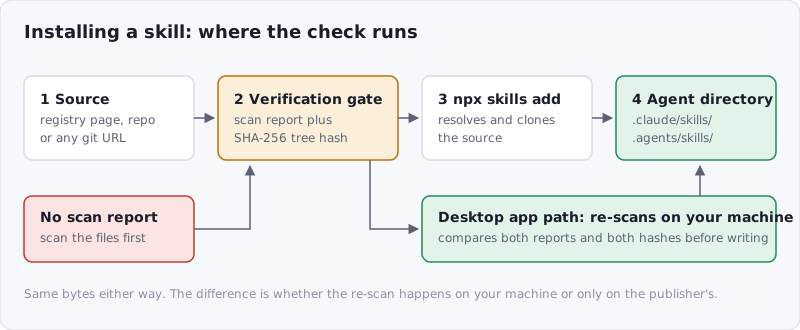
Figure: the CLI path and the desktop-app path install the same bytes. Only one of them re-scans on your machine and compares the result against the publisher’s report before writing.
Three checks, in increasing order of effort:
1. Read the report, not the star count. A SkillSafe skill page shows the scan verdict, the findings by severity, and the full file list before you install anything. A repository you found on GitHub has none of that — run it through the free scanner first, which needs no account.
2. Prefer a hash you can compare. A registry listing pins a name to a mutable branch head; a tree hash pins it to bytes. Dual-side verification is the model: the publisher scans before sharing, your client re-scans what it actually downloaded, and the server compares both reports plus both hashes, returning verified, divergent or critical. A hash mismatch blocks the install rather than warning about it.
3. Use the client that does step 2 for you. npx skills add clones what the remote serves and writes it; it does not re-scan the contents on your machine or compare them against a publisher’s report. The AI SkillSafe desktop app does: it downloads, re-scans locally, compares its own report and hash against the publisher’s, and only then writes files into the agent’s directory. That is the difference described in the app announcement — same registry, same skills, one extra gate.
None of this is exotic. It is --list before add, a scan report before a repository you have never read, and a verdict that is computed where you are rather than where the publisher was.
Frequently Asked Questions
What does npx skills add do?
It resolves a source — a GitHub shorthand, a git URL, a local path or a download URL — reads its SKILL.md files, and writes them into the skills directory of every coding agent it detects, across 79 supported agents. Project scope is the default; -g installs globally. The files are written, not run — the risk arrives when your agent reads them.
Where does npx skills add install skills for Claude Code?
.claude/skills/ inside the project and ~/.claude/skills/ globally, matching Anthropic’s own documentation. Cursor, Codex, OpenCode, Gemini CLI and GitHub Copilot all take .agents/skills/ at project scope and differ only in their global path, so one project install can serve five agents.
How do I remove or update a skill installed with npx skills?
npx skills remove <name> removes it; add -a cursor for one agent, -g for global scope, or --all to clear everything. npx skills update re-resolves every installed skill against its source; npx skills update -g -y does it non-interactively for global scope. npx skills list shows what is installed first.
Is it safe to run npx skills add?
The CLI itself is MIT-licensed and open source, with 31,876 GitHub stars and 34 million npm downloads a month. The risk is the skill, not the tool: Snyk found 36.82% of 3,984 audited skills carried a security flaw. Read the scan report, or scan the source yourself at skillsafe.ai/scan/, before installing.
How to find Claude Skills in GitHub?
npx skills find <query> searches interactively or by keyword, and --owner vercel restricts it to one organisation’s repositories. For a searchable index with scan reports attached, the SkillSafe registry holds 30,433 skills, and skills.sh publishes an install leaderboard topped by find-skills at 3.4M installs.
The install step is where a skill stops being text and starts being instructions your agent follows. One command does it, on any of 79 agents, from any git source — which is exactly why the thirty seconds before the command are worth more than the command.
More on installing and running skills: on any machine · shared with no install · browse the registry · more Claude Code posts