@haowjy/cw-story-critique

Creative Writing Skills


Write novels, short stories, and serial fiction with AI that maintains your voice, tracks your continuity, and gets better the more you use it. From first brainstorm to polished draft: specialized agents handle each mode of work (writing, critiquing, revising, exploring) while shared skills carry the craft methodology.
What you get:
- Brainstorm without committing: explore plot options, character arcs, and world mechanics with multiple AI perspectives before deciding anything
- Write in your voice: create style files from your existing prose, then draft new scenes that match
- Catch your own mistakes: structured critique, continuity checks, and simulated reader reactions
- Keep everything in sync: knowledge base updates as your story evolves
Quick Start
Install for your environment: meridian-cli, Claude Code / Cowork or Claude.ai.
Run project setup once, before you write anything. Agents never start it for you; you do:
Environment Run meridian-cli meridian bootstrap(runs automatically in your first session)Claude Code / Cowork /creative-writing-skills:project-setupClaude.ai turn on project-setupand ask it to set up your projectIt interviews you about the project, collects writing samples, and creates your
AGENTS.md, thekb/layout and your first style files. Every agent reads those, so skipping this step makes them guess your conventions.Start writing with muse, your creative partner:
meridian(meridian-cli),claude --agent creative-writing-skills:muse(Claude Code), or turn oncreative-writing-muse(Claude.ai).
Installation
Mars (meridian-cli)
meridian mars add haowjy/creative-writing-skills
meridian mars sync
Then run meridian to start a meridian-cli session with muse. First-time setup runs the bootstrap automatically.
@writer defaults to Gemini 4 Argon (argon). Mars routes it through OpenCode, so enable the .opencode target in your mars.toml and sign in to a provider there that serves it; otherwise writer runs on Opus.
Claude Code / Cowork
Claude Code and Cowork use the same plugin format.
Claude Code: add the marketplace and install:
/plugin marketplace add haowjy/creative-writing-skills
/plugin install creative-writing-skills@creative-writing-skills
Cowork: in the sidebar, Customize → Personal plugins → + → Create plugins → Add marketplace → Add from repository, enter haowjy/creative-writing-skills, then install the creative-writing-skills plugin. (Same flow as Claude.ai below — Cowork just also runs the agents.)
Once installed, start a session with muse as your agent:
claude --agent creative-writing-skills:muse
Run the one-time project setup to create your AGENTS.md, kb/ layout, and
style files:
/creative-writing-skills:project-setup
Claude.ai
creative-writing-muse turns an ordinary Claude chat into a creative writing partner. Turn it on, tell it what you're working on, and it carries you from first idea to finished draft in one conversation — talking through ideas, drafting scenes in your voice, flagging what isn't working, and revising. The other skills (prose, scene craft, critique, structure) are the craft knowledge it draws on; you don't have to invoke them yourself.
First, add the skills to claude.ai — pick one:
Add the marketplace (easiest): in the sidebar, Customize → Personal plugins → + → Create plugins → Add marketplace → Add from repository, enter
haowjy/creative-writing-skills, and click Sync.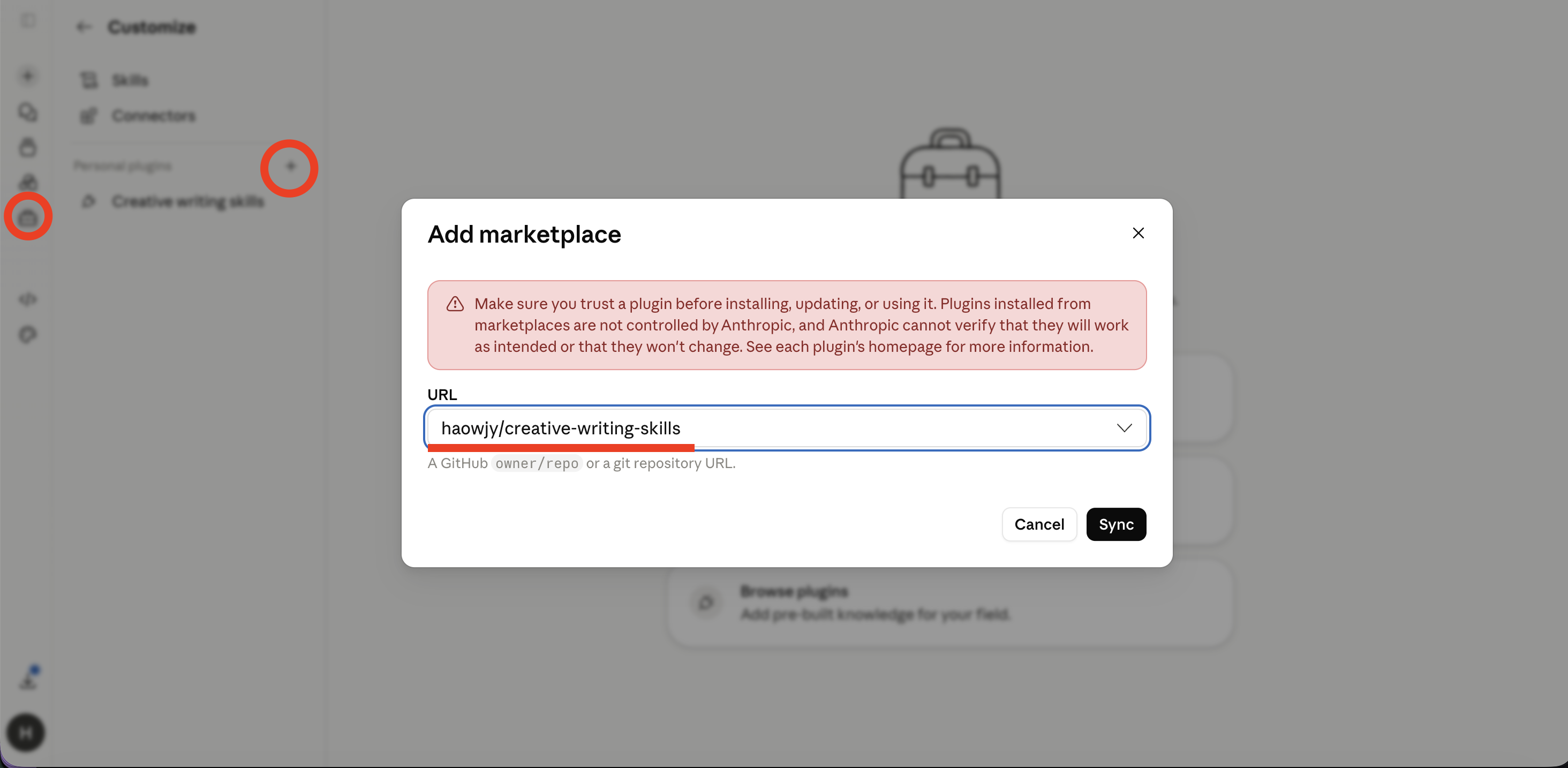
Upload the files: download the
.skillfiles from the latest release, then Customize → Skills → "+" → Upload skill for each one.
Then start a chat, turn on creative-writing-muse, and describe what you want to write — it leads from there. Adding skills one at a time instead? Start with creative-writing-muse, writing-principles, creative-writing-craft, and story-review.
Run project-setup once before writing. On claude.ai it returns the AGENTS.md, kb layout, and style guidance as text to save; in Cowork it writes them into the project.
Want to build the files yourself? Clone the repo and run
python scripts/create_skill_zips.pyto regenerate them inzips/. It packages the committedplugin/claude/skillstree; runmars build pluginfirst if you changed a source skill.
How It Works
flowchart TB
    You([You]) --> M[muse]

    M --> Explore
    M --> Draft
    M --> Maintain

    subgraph Explore ["Explore & Plan"]
        direction LR
        B[brainstormer] ~~~ CS[character-sim]
        CS ~~~ O[outliner]
    end

    subgraph Draft ["Draft & Revise"]
        direction TB
        W[muse drafts, or writer] --> CR[critic lanes]
        CR -->|findings or editorial memo| W
        M -.->|pivotal scenes| RS[reader-sim]
        M -.->|canon check| CC[continuity-checker]
    end

    subgraph Maintain ["Knowledge"]
        direction LR
        KL[kb-lead]
        SC[style-creator]
    end

    Explore -->|direction confirmed| Draft
    Draft -->|decisions & facts| Maintain
    Maintain -.->|context for next session| Explore
Explore: Fan out brainstormers for creative variety. Spawn character-sims to discover voices. Use outliners to shape structure once a direction is chosen.
Draft & Revise: Muse drafts and revises with you, and hands writer the passes that need their own session: alternate takes on another model, a polish pass you ask for, or a very long draft. Each critic runs one lane: a focus area for depth on one craft dimension, or an edit level, where editorial review gives the holistic book-editor priority across structure, voice, line quality, and surface. After two critique rounds on a chapter, muse brings you what is still open and you decide. Reader-sim gives experiential signal on pivotal scenes.
Knowledge: When a chapter, revision, or ruling settles, muse dispatches kb-lead with the story-memory skill and your decisions quoted with their hedges, so a trial stays a trial; in harnesses without agents it applies story-memory itself. Style-creator captures voice patterns from prose samples. The kb grows as the project evolves, giving every future agent accurate context.
Agents
| Agent | Role |
|---|---|
| muse | Author-facing creative partner for all story work: talks, plans, and drafts with you, spawns critique and knowledge capture, and owns the verdict |
| writer | Production prose in one mode (draft, revision, bridge, alternate take, line polish) for passes that need their own session |
| critic | Diagnoses a draft in one lane: a focus area (structure, character, voice, prose, continuity) or an edit level (editorial review, developmental, line edit, copyedit, proofreading) |
| reader-sim | Experiential reader response to a draft, moment by moment |
| character-sim | In-character conversation for voice discovery and relationship testing |
| continuity-checker | Cross-references content against established canon for contradictions |
| brainstormer | Creative option generation for a scoped question or angle |
| outliner | Sequences confirmed direction into arc, chapter, and beat-level outlines |
| style-creator | Analyzes prose samples to produce style reference files for the project's voice |
| kb-lead | Mines settled work for decisions and updates the kb; the agent behind story-memory |
Four meridian-base delegates ship with the plugin for the work around the writing: explorer reads widely and reports facts, session-miner mines past sessions for decisions already made, cold-reader checks text that outlives the work for what a reader who wasn't there cannot follow, and kb-maintainer refactors a documentation tree's structure.
Knowledge extraction into the kb in harnesses without agents stays in the conversation: the muse applies the story-memory skill directly.
Skills
| Skill | Purpose |
|---|---|
| creative-writing-craft | Prose modes (fresh draft, revision, bridge, alternate take, line polish) and craft references for prose, scenes, style, voice, and genre |
| writing-principles | Reader reward channels, AI failure modes, and fiction-specific taste discipline |
| story-planning | Direction, brainstorming, outlining, and story architecture before pages exist |
| story-review | Editorial review, developmental edit, line edit, copyedit, proofreading, craft critique, and reader-signal synthesis |
| story-memory | Context, fact extraction, reference writing, artifact layout, and persistent issue tracking |
| reader-sim | First-time reader simulation from a specified persona |
| character-sim | In-character conversation for voice and relationship testing |
| creative-writing-muse | The muse's method: one creative partner that talks, plans, drafts, and spawns what needs its own context; turn it on in any environment |
| story-workflow | The lifecycle of story work: intent, direction, drafting, critique rounds, the verdict, knowledge capture, presenting |
| writing-staffing | Which agent takes which lane, what to tell it to load, and how many lanes to run |
| llm-writing | Intentional language discipline: catches unchosen LLM defaults while preserving deliberate ambiguity, omission, repetition, and rhythm |
| shared-dao | Shared vocabulary: canonical story terms, aliases, and ambiguity resolution |
| project-setup | One-time guided setup (user-invoked): interviews you, then creates AGENTS.md, the kb layout, and style files |
The plugin also ships the shared meridian-base skills its agents load: grill (with grill-with-docs) to stress-test a direction in rounds of questions, correct to fix a class of repeated mistake at the strongest level that holds, zoom-out for orienting in an unfamiliar area, and knowledge-layers, qi-layer, qi-maintenance, information-hierarchy, intent-modeling, md-validation, reflect, shared-workspace, and structured-artifact for the rest of the knowledge and craft discipline.
Project Layout
my-story/
├── AGENTS.md              # Project conventions (created by project-setup)
├── story/                 # Chapters and manuscript
├── work/                  # Current drafting effort
│   ├── outline/
│   ├── drafts/
│   ├── critique-reports/
│   └── brainstorm/
└── kb/                    # Durable knowledge base
    ├── styles/            # Voice reference files
    ├── characters/        # Character state and profiles
    ├── world/             # Locations, lore, systems
    ├── timeline/          # Chronology
    ├── canon/             # Established facts
    └── issues/            # Tracked writing problems
Compatibility
| Feature | Claude Code | Cowork | Mars (meridian-cli) | Claude.ai |
|---|---|---|---|---|
| All agents | Yes (flat) | Yes (flat) | Yes | No (grayed out in chat) |
| All skills | Yes | Yes | Yes | Marketplace add or zip |
| Multi-agent orchestration | Via muse | Via muse | Via muse → focused workers | No |
| Project setup | Yes | Yes | Yes | Text to save |
Claude Code, Cowork, and meridian-cli run muse as the session agent: it drafts with you and spawns a compact worker set: writer, critic, reader-sim, brainstormer, outliner, character-sim, style-creator, continuity-checker, and web-researcher. You can add the marketplace to the Claude desktop app from GitHub; Cowork runs the agents, but plain claude.ai chat runs skills only (agents grayed out) — there the creative-writing-muse skill runs the same muse method in one conversation, backed by the craft skills.
Current Experiments
Rhetorical questions in skill prompts. The economy section in writing-principles uses rhetorical questions ("what can you leave out and still have the scene work?") rather than declarative statements. LLMs can distinguish rhetorical from information-seeking questions internally (arxiv 2604.14128), and Self-Ask prompting shows questions improve reasoning, but no research directly tests whether rhetorical questions in system prompts improve task performance vs. equivalent declaratives. Keeping the rhetorical form to see if it activates a self-check loop that declaratives don't.
Development
Rebuild the plugin
The Claude/Codex/Grok, Cursor, and OpenCode plugin trees in plugin/, the
marketplace catalogs, and the root OpenCode package.json are generated by
Mars from agents/, skills/, bootstrap/, and the dependency graph. After
editing a source agent or skill, rebuild and commit the output:
mars build plugin # Mars 0.20.6 or newer
mars check reports stale or hand-edited output; CI rebuilds and fails on any difference.
Validate package
mars check
Release
mars version patch               # bump, rebuild plugin/, promote CHANGELOG, commit, tag
mars version patch --push        # also push the commit and tag
Use mars 0.20.6 or newer (uv tool install mars-agents); it rebuilds plugin/ and the marketplace catalogs at the new version inside the release commit.
License
Apache License 2.0. See LICENSE.
Loading...
Select a file to preview
Analyzing security...
Checking scan reports and verification data.
Bill of Materials
Everything this skill can do — files, network, commands, and more.