Agent Skills vs MCP vs Plugins: What Each Is and When to Use It
An agent skill is a SKILL.md folder an agent loads on demand; MCP is a live protocol to tools and data; a plugin bundles both. What to use when.
An agent skill is a folder with a SKILL.md file — instructions plus optional scripts, references and templates — that an agent loads on demand to follow a workflow. MCP is a live protocol connecting an agent to external tools and data. A plugin is a distribution unit that can bundle both. Anthropic shipped all three between November 2024 and October 2025.
The open standard defines the first of the three in one sentence:
Agent Skills are a lightweight, open format for extending AI agent capabilities with specialized knowledge and workflows. At its core, a skill is a folder containing a
SKILL.mdfile.— Agent Skills, Overview (agentskills.io, the open standard)
They are not competing options. Skills carry procedure, MCP carries connectivity, plugins carry distribution, and a serious setup uses all three. This post defines each from its primary source, puts them side by side in one table, and gives the rule for choosing.
Key figures
| Figure | What it measures | Source |
|---|---|---|
| Nov 25, 2024 | MCP open-sourced by Anthropic | Anthropic |
| Oct 9, 2025 | Claude Code plugins enter public beta | claude.com |
| Oct 16, 2025 | Agent Skills announced | claude.com |
| Dec 18, 2025 | Agent Skills published as an open standard | claude.com |
| 3 stages | Progressive disclosure: discovery, activation, execution | Agent Skills spec |
| about 100 tokens | Per-skill metadata loaded at startup (name + description) | Agent Skills spec |
| 64 / 1,024 chars | Maximum length of a skill’s name / description | Agent Skills spec |
| under 5,000 tokens | Recommended ceiling for the SKILL.md body once activated | Agent Skills spec |
| 500 lines | Recommended maximum SKILL.md length before splitting it | Agent Skills spec |
| 46 | Agent products listed on the Agent Skills Client Showcase | agentskills.io |
| 79 | Agents npx skills add can install a skill into | vercel-labs/skills |
| 2026-07-28 | Current version of the MCP specification | modelcontextprotocol.io |
| 10 | Component slots a Claude Code plugin directory can fill | Claude Code plugin docs |
| 36.82% | Public skills Snyk found carrying at least one security flaw | Snyk ToxicSkills |
| 36.5% | Average MCP tool-poisoning success rate across 20 agent models | MCPTox (arXiv:2508.14925) |
What an agent skill is
A skill is a directory. The only required file is SKILL.md, which holds YAML frontmatter and Markdown instructions:
my-skill/
├── SKILL.md      # required: frontmatter (name, description) + instructions
├── scripts/      # optional: executable code the agent can run
├── references/   # optional: documentation loaded only when needed
└── assets/       # optional: templates, schemas, images
The specification is small enough to read in ten minutes. name is capped at 64 characters, lowercase with hyphens, and must match the directory name. description is capped at 1,024 characters and is the field that decides whether the skill ever fires — it should say both what the skill does and when to use it. Everything else (license, compatibility, metadata, allowed-tools) is optional.
What makes a skill a feature rather than a file on disk is progressive disclosure, which runs in three stages. At startup the agent reads only each skill’s name and description — roughly 100 tokens apiece. When a task matches, it loads the full SKILL.md body, which the spec recommends keeping under 5,000 tokens and 500 lines. Bundled scripts and reference files load only if the instructions call for them.
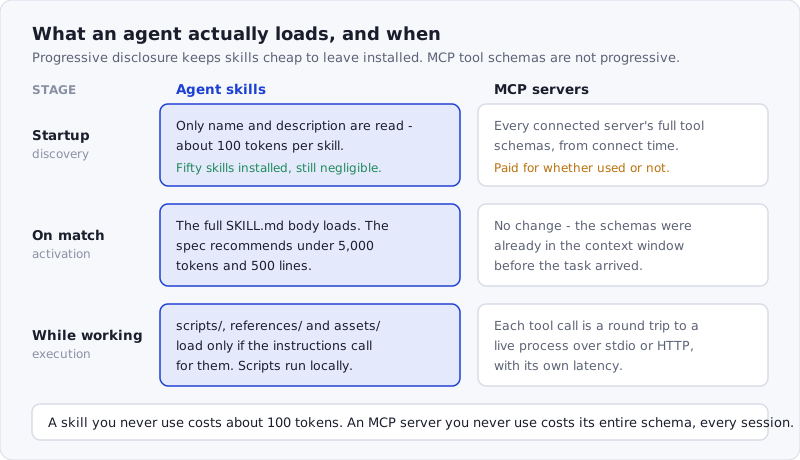
Figure: skills are cheap until used — about 100 tokens each at startup. MCP tool schemas are not: they are in the context from the moment the client connects.
That is the whole trick, and it is why a developer can keep fifty skills installed without paying for them. Anthropic’s Agent Skills documentation puts the same mechanism in one line: unlike prompts, “Skills load on demand, so you don’t have to repeat the same guidance across conversations.”
Skills are also portable in a way the other two layers are not. Anthropic released the format as an open standard on December 18, 2025, and the Client Showcase now lists 46 agent products that read it, including Claude Code, Cursor, GitHub Copilot, VS Code, Gemini CLI, OpenCode and Codex. Simon Willison made the point on announcement day, before any of that existed:
Something else I love about the design of skills is there is nothing at all preventing them from being used with other models. You can grab a skills folder right now, point Codex CLI or Gemini CLI at it and say “read pdf/SKILL.md and then create me a PDF describing this project” and it will work.
Nothing in a skill is executable by itself. It is text that an agent with a filesystem, a shell and a network reads and acts on — which is the whole security story, and we come back to it below.
What MCP is
The Model Context Protocol is the connection layer. Anthropic open-sourced it on November 25, 2024, a year before skills existed. The specification’s own introduction:
MCP (Model Context Protocol) is an open-source standard for connecting AI applications to external systems. […] Think of MCP like a USB-C port for AI applications.
— modelcontextprotocol.io, specification version 2026-07-28
Mechanically: an MCP server exposes tools, resources and prompts; an MCP client (your agent) connects to it over stdio or HTTP and asks for the list. Each tool arrives with a name, a description and a JSON input schema, and every invocation is a request-response round trip to a live process. Given the same input, you get the same code path — an MCP tool call is an API call with a schema, not an instruction the model has to interpret.
That determinism is the trade. LlamaIndex’s engineers put the distinction better than anyone in a February 3, 2026 write-up:
For the agent, the challenge it faces with an MCP tool is deciding which tool to run and when only. Whereas the challenge it faces with a skill is to decide which skill to use, when, and how.
The costs are the mirror image of a skill’s. Tool schemas load when the client connects, not when they are needed — Willison notes that GitHub’s official MCP server “famously consumes tens of thousands of tokens of context” on its own. Every call crosses a process or network boundary, so latency is per-invocation. And a server needs setup: transports, auth, a config file. Red Hat’s Cedric Clyburn draws the line the same way in MCP servers vs. skills (May 25, 2026): use MCP when the application needs real-time external data in a controlled, tightly permissioned way; use skills when you keep repeating the same prompts or need consistent output across a team.
What a plugin is
A plugin is neither knowledge nor a connection. It is a packaging and distribution unit for a specific host — in practice, Claude Code, which shipped plugins on October 9, 2025, a week before skills.
A plugin is a directory with an optional .claude-plugin/plugin.json manifest and up to ten component slots at its root, per the plugin documentation: skills/, commands/, agents/, hooks/, .mcp.json, .lsp.json, monitors/, bin/, settings.json, and the manifest directory itself. So a single plugin can ship three skills, two subagents, a pre-commit hook and the MCP server config they all depend on, and a teammate installs the lot with one /plugin command. Skills inside a plugin are namespaced — hello in a plugin named my-first-plugin is invoked as /my-first-plugin:hello — so two plugins can ship a skill with the same name without colliding.
Distribution is a git repository with a .claude-plugin/marketplace.json file. That is the entire marketplace mechanism: /plugin marketplace add user-or-org/repo-name, then browse and install.
Two consequences follow. First, a plugin is not an MCP server, though it can contain one — the .mcp.json slot is one of ten. Second, a plugin is host-specific in a way a skill is not: the Agent Skills format is read by 46 products, while a Claude Code plugin is a Claude Code construct. If portability matters, publish the skill; if team standardization matters, wrap it in a plugin.
Tools and subagents, briefly
Two more terms show up in the same conversation.
A tool is the primitive underneath MCP. In Anthropic’s API, tool use — also called function calling — lets the model call functions you define or that the vendor provides; the model returns a structured call, and either your code or the vendor’s infrastructure executes it. MCP is one way to supply tools to an agent. The agent’s built-in file reader and shell are also tools. So “agent tools” and “MCP” are not synonyms: MCP is a standard for delivering tools from an external process.
A subagent is a separate context window with its own system prompt, tool access and permissions. Claude Code’s subagent docs frame it as a context-management move: send a side task that would flood the main conversation with logs and search results to a worker that returns only the summary. A skill says how to do something; a subagent says where it runs. They compose — a skill can instruct the agent to delegate to a subagent.
The comparison in one table
| Agent skill | MCP server | Plugin | |
|---|---|---|---|
| What it carries | Markdown instructions, plus optional scripts, references, assets | Tool definitions with JSON input schemas, plus resources and prompts | Any combination of skills, subagents, hooks, MCP configs, LSP configs, executables |
| Where it runs | In the agent’s own context; bundled scripts run locally under your account | A separate local process (stdio) or a remote service (HTTP) | Nothing runs — it is packaging; contents run wherever they normally would |
| Who installs it | A developer, into a project or user skills directory | A developer, into the client’s MCP config | A developer or team lead, from a plugin marketplace |
| Trust surface | Everything the agent can already do: files, shell, network, credentials | The server’s code plus every description it serves, re-fetched at runtime | The union of everything inside, approved in a single decision |
| Example | pdf-processing: extract text, fill forms, merge files | A Postgres server exposing query and list_tables | A team plugin with a review skill, a lint hook and a Jira MCP server |
| Context cost | About 100 tokens per skill until it fires | Full tool schemas from the moment the client connects | Whatever its contents cost, toggleable on and off |
| Choose it when | The agent has the capability but not the procedure | The data or action sits behind a network boundary or auth | You are shipping more than one of the above to more than one person |
How to choose: knowledge, connection, or distribution
The decision collapses to one question. Ask what is actually missing.
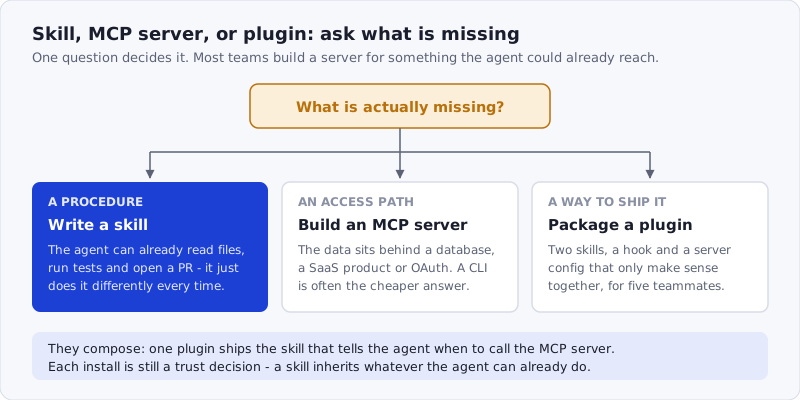
Figure: knowledge, connection, distribution. Most teams reach for MCP when the honest answer is that the agent already had access and only lacked the procedure.
Missing knowledge → write a skill. The agent can already read the repo, run the tests and open a PR, but does it differently every time. Nothing needs to be connected; something needs to be written down. This is also the cheapest thing to try, because a skill is a Markdown file you can delete.
Missing access → build an MCP server, or wrap a CLI. The data is in a database, a SaaS product or behind OAuth, and the agent has no path to it. Worth saying out loud: a command-line tool is often the better answer. Willison’s argument is that LLMs already know how to run cli-tool --help, so a CLI costs no context until it is used, while an MCP server’s schemas cost context from connect time. Build the server when you need a permissioned, auditable boundary — which is exactly what a CLI does not give you.
Missing a distribution unit → package a plugin. You have two skills, a hook and a server config that only make sense together, and five teammates need the same setup. That is a packaging problem, and plugins exist for it.
The failure mode worth naming: teams build an MCP server for something the agent could already do. LlamaIndex reported the reverse case from their own product — with a documentation MCP server already connected, their skills “were rarely invoked, and often did not yield substantially better results.” Decide which gap you have before writing either.
The security surface is different in all three
A skill inherits the agent’s permissions. It does not request them, and there is no sandbox between the two: if your agent can read ~/.aws/credentials, so can any instruction it is following. That is not a flaw in Claude Code — it is the property that makes agents useful — but it means installing a skill is a trust decision of the same weight as installing a dependency, which we work through in Claude Code skill security.
The numbers say the ecosystem has not caught up. Snyk’s ToxicSkills audit scanned 3,984 public skills and found at least one security flaw in 36.82% of them, a critical issue in 13.4%, and 76 confirmed malicious payloads — what those payloads did ranged from credential stealers to backdoors. The ClawHavoc campaign put 1,184 malicious skill packages on one registry. And the attacks are getting harder to see: SkillJect hides the payload in a helper script and rewrites SKILL.md so running it reads as ordinary setup, reaching 80.7% attack success on Claude Code while four scanners caught it 61.5% of the time.
MCP’s surface is different in kind. The server is a live process that re-serves its tool descriptions on every connection, so the text the model reads can change after you approved it. The MCPTox benchmark measured a 36.5% average success rate for instructions hidden in tool descriptions across 20 agent models — the mechanics are in MCP tool poisoning, and the defensive checklist is in our MCP security guide.
Plugins inherit both surfaces and add one property: a single install approves everything inside. That is the point of plugins, and it is also why a plugin from a marketplace deserves more review than any one of its parts would.
Practically: read a skill before installing it — it is Markdown, and reading it takes a minute. Run anything you did not write through the SkillSafe scanner, which is free and needs no account. SkillSafe indexes 30,423 skills with a scan report attached to each shared version; you can browse them here.
What installing each one actually does
For skills, the install path is git. Every SkillSafe skill is a git endpoint, so Vercel’s open-source skills CLI works with no vendor-specific tooling:
npx skills add https://api.skillsafe.ai/{ns}/{name}It detects which agents you have installed and writes the folder into each one’s own directory — .claude/skills/ for Claude Code, .agents/skills/ for Cursor and Codex, .windsurf/skills/ for Windsurf — across 79 supported agents. The AI SkillSafe desktop app does the same through a deep link if you prefer a GUI. Either way the files land on disk, which is why the same skill runs on every machine you use.
For MCP, installing means editing a client config — a .mcp.json in the project or the client’s own settings — and the server starts as a child process or a remote connection. For plugins, /plugin marketplace add owner/repo then /plugin install, and Claude Code loads the contents as a namespaced unit you can toggle off.
Frequently Asked Questions
Are agent tools and MCP the same?
No. A tool is a function the model can call, defined by a name, a description and an input schema. MCP is a protocol for delivering tools (plus resources and prompts) from an external server to an agent. Tools also come from the agent’s own runtime and from vendor APIs, with no MCP involved.
Can you give me an example of an agent skill?
Anthropic’s pdf-processing skill is the canonical one: a folder whose SKILL.md describes extracting text and tables, filling forms and merging PDFs, with Python helpers in scripts/. Its description tells the agent when to fire — “use when working with PDF documents” — and the 1,024-character limit on that field is the main authoring constraint.
What is the difference between agent skills and tools in agentic AI?
A tool is a callable function with a fixed signature; the agent decides which to call and when. A skill is procedural knowledge in Markdown; the agent decides which to load, when, and how to follow it. Tools give capability, skills give procedure, and skills routinely orchestrate several tools.
Can MCP be an agent?
No. MCP is a protocol with two roles, client and server. The agent is the client. An MCP server exposes tools, resources and prompts, and it can be backed by an agentic system, but the protocol itself carries no reasoning loop — which is why “MCP server” and “agent” are not interchangeable terms.
Should I build an MCP server, a CLI, an agent skill, or a custom tool?
Start with the gap. No procedure, but access exists: a skill. No access to live or authenticated data: an MCP server. Access that a human would get from the terminal: a CLI, which costs zero context until called. A one-off function inside your own application: a custom tool in the API.
Are Claude plugins the same as skills?
No. A skill is a SKILL.md folder in an open format that 46 agent products read. A plugin is a Claude Code packaging unit that can contain skills along with subagents, hooks, MCP configs and executables. Every plugin can carry skills; no skill carries a plugin.
Are Claude Code plugins MCP servers?
No, though a plugin can ship one. .mcp.json is one of the ten component slots in a plugin directory, alongside skills/, agents/, hooks/ and bin/. Installing such a plugin registers its MCP servers with Claude Code, which is convenient and also means one approval covers them.
What is the difference between a plugin and an MCP?
A plugin is packaging; MCP is a connection. The plugin never runs anything itself — it places skills, hooks and configs where the host expects them. An MCP server is a live process the agent talks to over stdio or HTTP for the whole session. You can install a plugin whose only content is an MCP server config.
Three layers, three questions. Does the agent lack a procedure, an access path, or a way to hand both to a teammate? Answer that and the tooling choice makes itself — and whichever you pick, read the source before it runs with your credentials.